Time Series Visualization with Pandas

pandas
dataframe
time-series
visualization
matplotlib
Learn to create compelling time series visualizations using Pandas and Matplotlib. Master line plots, area plots, and customization techniques for effective temporal data analysis.
Author

Mohammed Adil Siraju

Published

September 21, 2025

Time series data visualization is crucial for understanding trends, patterns, and changes over time. This notebook covers:

Effective visualization helps you communicate temporal patterns and insights from your data.

1. Creating Time Series Data

Letโ€™s start by creating time series data using Pandasโ€™ powerful datetime capabilities.

Creating a Time Series with DateTime Index

Use pd.date_range() to create a sequence of dates, then create a Series with datetime index:
import pandas as pd

time_index = pd.date_range('2025-01-01', periods=5, freq='D')
ts_data = pd.Series([100,120,80,110,90], index=time_index)

ts_data
2025-01-01    100
2025-01-02    120
2025-01-03     80
2025-01-04    110
2025-01-05     90
Freq: D, dtype: int64

Converting Series to DataFrame

You can easily convert a time series Series to a DataFrame for additional operations:

df = pd.DataFrame(ts_data)
df
0
2025-01-01 100
2025-01-02 120
2025-01-03 80
2025-01-04 110
2025-01-05 90

2. Basic Time Series Visualization

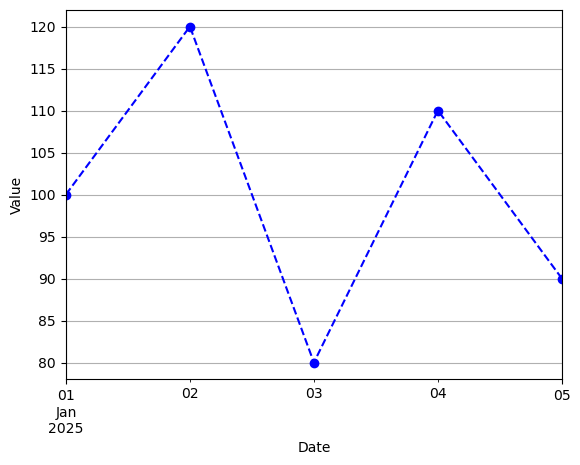
Pandas integrates seamlessly with Matplotlib for creating time series plots. The .plot() method provides an easy interface for visualization.

Line Plot with Customization

Create a line plot with markers, custom colors, and styling:

import matplotlib.pyplot as plt

ts_data.plot(kind='line', marker='o', color='b', linestyle='--')
plt.xlabel('Date')
plt.ylabel('Value')

plt.grid()
plt.show()

Summary

Time series visualization is essential for understanding temporal patterns in your data. In this notebook, you learned:

๐Ÿ“… Time Series Creation

  • pd.date_range(): Create sequences of dates
  • Datetime indexing: Set dates as DataFrame/Series index
  • Series to DataFrame conversion

๐Ÿ“Š Visualization Techniques

  • Line plots: Basic time series visualization with .plot()
  • Customization: Colors, markers, line styles, and labels
  • Matplotlib integration: Pandas plotting with Matplotlib backend

๐ŸŽจ Plot Customization Options

  • kind='line': Line plot type
  • marker='o': Data point markers
  • color='b': Line colors
  • linestyle='--': Line styles (solid, dashed, etc.)
  • plt.xlabel(), plt.ylabel(): Axis labels
  • plt.grid(): Add grid lines

๐Ÿ’ก Key Concepts

  1. Datetime Index: Essential for time series operations
  2. Plot Method: Pandasโ€™ built-in plotting interface
  3. Matplotlib Integration: Customize plots with full Matplotlib control
  4. Clear Labeling: Always label axes and add titles

๐Ÿš€ Best Practices

  • Use appropriate date ranges for your analysis period
  • Choose colors and styles that enhance readability
  • Add grid lines for better value estimation
  • Label axes clearly for context

๐Ÿ“ˆ Next Steps

  • Explore advanced plots (area plots, bar plots)
  • Learn about subplots for multiple time series
  • Practice with real time series datasets
  • Experiment with different styling options

Mastering time series visualization will help you effectively communicate temporal trends and patterns! ๐Ÿ“Šโฐ